


Easy Invoice & Estimate Maker
4.8836.00 Reviews
App Specs
- Version
- 4.42.0
- Updated On
- License
- Free
- Downloads
- 100,000+
- Developer
- Easy Expense Tracker
- Categories
- Business
- Platform
- Android
Screenshots
 Analysis by AppCompare
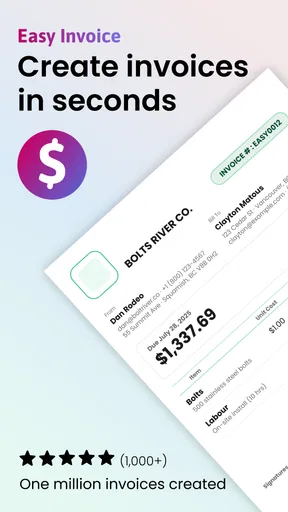
When a household shares a phone or tablet, business paperwork can quickly become mixed up with personal messages, photos, and other people’s accounts. I find an invoicing app most useful when it gives the person doing the work a clear place to prepare estimates and bills without turning the whole device into a shared business account. Easy Invoice & Estimate Maker is aimed at that practical job: making professional-looking invoices and estimates from a mobile device.
A shared device still needs clear boundaries
If you use one device for both household and business tasks, decide whose business details and client records belong in the app before entering anything. An invoice can contain names, contact details, and amounts owed, so it is better treated as work material than as a general family record. I would avoid letting several people casually edit the same client information unless they have agreed on who is responsible for keeping it accurate.
That distinction matters even when everyone is helping. A partner might remind you to send an estimate, while a child might borrow the phone to watch a video; those are very different kinds of access. I would keep invoice preparation to the person responsible for the business and hand over the device only when the screen and task are appropriate. The app is a business tool, not a household organizer or a substitute for clear account boundaries.
Who benefits from a phone-based invoice workflow?
I can see this working well for a solo contractor, a tutor, a cleaner, or another small operator who needs to prepare a quote shortly after discussing a job. The useful habit is to capture the client and job details while they are still fresh, then review the amount and wording before sending anything. That can reduce the familiar end-of-day scramble through notes and messages to reconstruct what was agreed.
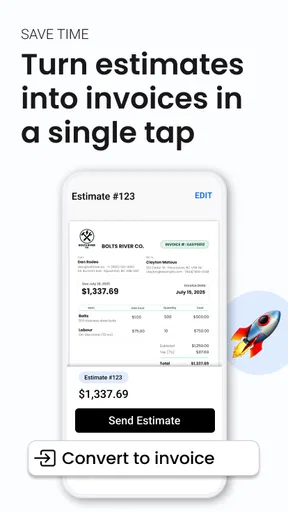
A realistic example: you finish a repair visit, and the customer asks what a follow-up job might cost. You can prepare an estimate while the scope is clear, check the figures, and send it without waiting to get back to a desk. If the customer later approves the work, keeping the estimate and client details organized can make the next administrative step easier. I would still compare the finished document with the original agreement; speed is helpful only when it does not introduce a pricing or scope mistake.
Use the estimate as a checkpoint, not just a document
One less obvious benefit of building an estimate before work begins is that it gives both sides a chance to catch misunderstandings. I recommend separating the task description from the price in your own notes before entering the details. That makes it easier to spot an omitted visit, an unclear quantity, or a service the customer thought was included. A polished layout cannot resolve an ambiguous agreement, but it can make the ambiguity easier to notice before it becomes a dispute.
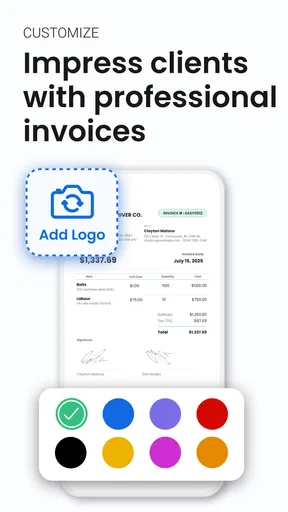
For repeat clients, consistency matters more than decoration. If you customize the document, keep the business identity and wording recognizable from one estimate to the next. A logo or color choice may help customers identify your paperwork, but changing the visual style every time can make records harder to scan. I would treat customization as a way to make documents clear and consistent, rather than as a design project that delays sending them.
Worth Reading Before You Choose

EA SPORTS FC Mobile 26 Is a Bigger Football Game, but It Takes Time

Flipboard Shows What News Apps Must Do Beyond the Feed

Switching to Android Auto Means Rethinking Your Driving Routine

Google Calendar Makes a Crowded Week Easier to Manage

Ludo King Makes the Most of the Minutes Between Plans

Baby Panda World Brings Quick Play to Modern Phones, but Its Game Library Feels Busy
What to consider before moving records onto a shared phone
Before entering a client list, think about whether this is the device you routinely use for work and whether other household members can access it. If the phone is borrowed often, make a habit of finishing the business task and returning to a neutral screen before handing it over. This is ordinary device discipline, not a feature I would assume the app provides. For a business with sensitive records or several staff members, a dedicated work device and a more formal account-management setup may be a better fit.
There is also a practical question about continuity. A phone is convenient when you are out meeting a customer, but you should not make it the only place you remember essential business obligations. Keep whatever independent records your work requires, and confirm that the final invoice or estimate has been saved or delivered before relying on it as complete. The app can support a workflow; it cannot replace a sensible backup and review routine.
Coordination without turning everyone into an editor
For a household-run business, one person can handle the document while another helps with reminders, scheduling, or checking the job description. That division keeps responsibilities understandable: the person who knows the agreed price should approve the figures, and the person who communicates with the client should confirm the recipient and wording. I would not assume that sharing a device automatically creates a shared record or a reliable handoff between people.
If two adults both prepare invoices, agree on a simple naming and review habit outside the app, such as checking the client and job before sending. This is especially useful when the same customer has several pieces of work in progress. The small pause helps prevent a correct invoice being sent for the wrong visit. If your operation depends on several people seeing the same live records and assigning work, a dedicated team invoicing service may suit you better than a lightweight mobile-first approach.
Age, trust, and responsible access
The app’s content rating is Everyone, but that does not mean every child should handle business records. The relevant issue is not whether the interface is suitable for a general audience; it is that invoices can contain private customer and financial information. I would keep access with the adults responsible for the business and avoid asking a child to manage payments, client details, or messages on the business’s behalf.
For a teenager learning basic small-business administration, an adult can demonstrate how an estimate is checked and why a client’s information should be handled carefully. Keep the lesson focused on the process and supervise any real records. This is a useful way to teach accuracy and responsibility, but it is not a reason to treat the app as a parental-control tool or assume it has family permissions.
Getting Started with Ease
The first thing I noticed when I fired up Easy Invoice & Estimate Maker is just how user-friendly it is. The interface is clean and intuitive, which is a huge plus for folks like me who aren't exactly tech wizards. Right off the bat, you can tell that this app is designed to make your life easier, not more complicated.
Once you download and open the app, you'll find a straightforward setup process. There's no fussing around with complicated tutorials or endless forms. You just input your business details, and bam, you're ready to start creating invoices and estimates. It’s as simple as that!
Features That Stand Out
Now, let’s talk about what this app can actually do. One of the coolest features is the ability to customize your invoices and estimates. You can add your logo, adjust the color scheme to match your brand, and create professional-looking documents in minutes. It’s all about making your business look good, and who doesn’t want that?
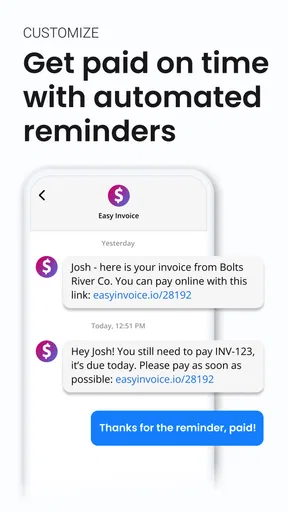
But wait, there's more! The app also offers a handy client management system. You can store client details, keep track of who owes you money, and even send out automatic reminders. It's like having a memory boost for your business interactions, ensuring you never miss a beat.
Streamlined Financial Management
One of the things I appreciated most was how Easy Invoice & Estimate Maker simplifies financial management. You can easily track your income and expenses, giving you a clear picture of your business’s financial health. This feature is perfect for small business owners who need to keep an eye on every penny.
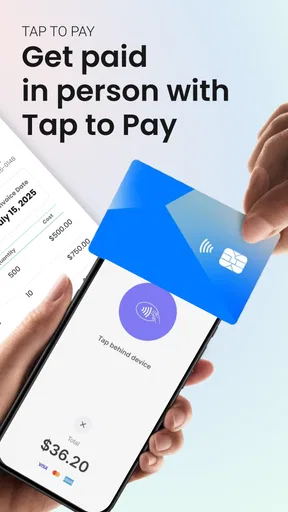
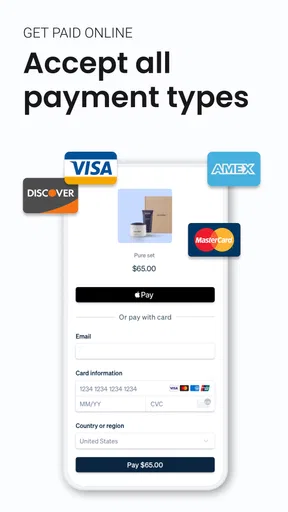
Plus, the app integrates seamlessly with various payment gateways, so getting paid is a breeze. No more chasing down late payments or fumbling around with different payment methods. It’s all about making the payment process as smooth as possible for both you and your clients.
On-the-Go Convenience
Let’s be honest, in today’s fast-paced world, being tethered to a desk is not an option. The beauty of this app is that it's mobile-friendly, allowing you to create and send invoices and estimates from anywhere. Whether you’re at a cafe, on a train, or lounging on the beach (lucky you!), business can keep moving.
Moreover, the app is available for both Android and iOS, so it doesn’t matter what kind of device you’re rocking. You’ve got the flexibility to manage your business finances on the go, which is a game-changer for busy entrepreneurs.
Support and Security
Now, let’s talk about something that often gets overlooked: customer support. If you’re anything like me, there’s nothing more frustrating than running into a problem and not being able to get help. Thankfully, the developer, Easy Expense Tracker, offers reliable support. Whether you have a technical question or need a little guidance, their support team is just a message away.
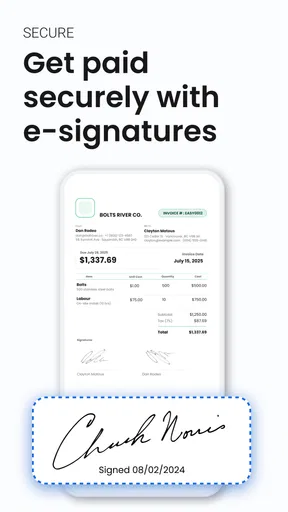
And of course, security is a top priority. The app employs robust security measures to keep your data safe and sound. You can rest easy knowing that your business information is protected against any potential breaches.
Where it fits among invoicing options
Easy Invoice is free to download, and its business focus is immediately clear: it brings estimates, invoices, client details, and basic income and expense tracking into a mobile workflow. Its average rating is 4.8 from around 3.1 thousand ratings, with over 100 thousand installs. Those figures suggest that many people have tried it, but I would still judge it by whether its way of handling your records suits your work.
Compared with a spreadsheet, a dedicated invoice app can make client-facing documents feel more consistent and reduce the effort of rebuilding the same layout. A spreadsheet may still be better if you need custom calculations, unusual reporting, or a structure that changes from job to job. Compared with accounting software, this app’s appeal is a more direct invoice-and-estimate routine; a fuller accounting package may be preferable when you need deeper bookkeeping, tax preparation, payroll, or collaboration across a team.
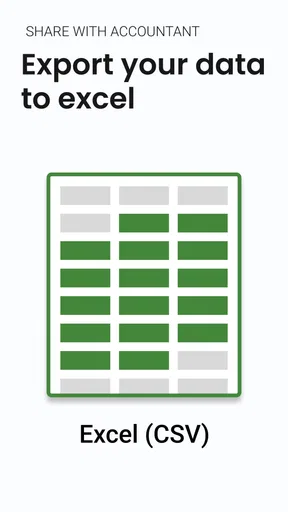
The practical trade-off is that an all-in-one phone workflow is convenient but can encourage you to treat invoice tracking as complete bookkeeping. I would use the app to stay on top of quotes, client balances, and everyday income and expenses, while checking that its records meet the needs of your accountant or local reporting obligations. If your business has complex taxes or reconciliations, a dedicated accounting system is the safer primary tool.
Cost, version, and fit
The app is free, with in-app purchases ranging from $2.49 to $249.99 per item. That wide range makes it sensible to check what a particular purchase covers before committing, especially if you only need occasional invoicing. You can start by deciding which parts of your workflow you actually use—customized documents, client tracking, reminders, or payment handling—rather than paying for extras simply because they are available.
It was released on October 9, 2020, and the current version is 4.19.2, with Android 8.0 as the minimum operating system. It is rated Everyone. I would check device compatibility before planning a business workflow around it, particularly on an older phone. The app is a stronger match for an owner-operator who wants to send documents while away from a desk than for someone who expects a full desktop accounting environment or formal multi-user controls.
A small review routine prevents avoidable mistakes
Before sending an estimate, I would check the customer’s name, the work description, the amount, and whether the document is an estimate rather than an invoice. Before sending an invoice, I would confirm that the work is complete as agreed and that the payment details are correct. These checks take little time and matter more than a polished template when the document affects what a customer expects to pay.
For reminders, choose a cadence that feels professional for your relationship with the client. Automatic nudges can save you from remembering every outstanding balance, but they should not replace judgment: a client may already have paid, may have raised a question, or may need a personal conversation. I would review the account before a reminder goes out, especially when handling several jobs for the same customer.
Household verdict
Easy Invoice & Estimate Maker is a sensible option for a small business owner who wants to prepare estimates and invoices on the move and keep everyday client and money details close at hand. In a household setting, its usefulness depends on keeping business records with the person responsible for them and agreeing on a careful review before documents go to customers. It is less suited to a family looking for shared household budgeting or a business that needs staff roles and advanced accounting in one place.
Final Thoughts
In a nutshell, Easy Invoice & Estimate Maker is a fantastic tool for any business owner looking to streamline their invoicing and estimation process. It’s packed with features that make life easier, from customization options to seamless payment integrations. The convenience of mobile access and strong customer support are just the cherries on top.
If you’re tired of wrestling with spreadsheets and manual calculations, give this app a whirl. It might just be the helping hand your business needs to keep things running smoothly. Don’t just take my word for it; download it and see for yourself!
Pros
- User-friendly interface
- easy for beginners.
- Customizable templates for invoices.
- Supports multiple currencies seamlessly.
- Real-time sync across devices.
- Efficient customer support and FAQs.
Cons
- Limited advanced features for large businesses.
- Occasional syncing delays reported.
- Free version has restricted functionality.
- No offline mode available currently.
- Ads can be intrusive in the free version.
FAQs for Easy Invoice & Estimate Maker
What features does Easy Invoice & Estimate Maker offer?
Easy Invoice & Estimate Maker provides a range of features including customizable invoice templates, automatic tax calculations, and the ability to generate estimates and invoices in multiple currencies. Users can also track payments, send reminders, and access detailed financial reports, making it a comprehensive tool for small business owners.
Is Easy Invoice & Estimate Maker available on both Android and iOS?
Yes, Easy Invoice & Estimate Maker is available for download on both Android and iOS platforms. It ensures seamless cross-device functionality, allowing users to create and manage invoices and estimates from their smartphones or tablets, catering to users who need flexibility in managing their finances on the go.
Does Easy Invoice & Estimate Maker support multiple languages?
Currently, Easy Invoice & Estimate Maker supports multiple languages to cater to a global audience. This feature is particularly useful for users who operate businesses internationally, allowing them to easily communicate with clients and customers in their native languages, thereby enhancing user experience and expanding business reach.
How user-friendly is Easy Invoice & Estimate Maker for beginners?
Easy Invoice & Estimate Maker is designed with a user-friendly interface that is intuitive and easy to navigate, even for beginners. The app offers step-by-step guidance and tutorials for setting up invoices and estimates, making it accessible for users with varying levels of technical expertise, ensuring a smooth onboarding process.
Is there customer support available for Easy Invoice & Estimate Maker users?
Yes, Easy Invoice & Estimate Maker offers robust customer support to assist users with any inquiries or technical issues they may encounter. Support options typically include email, chat, and a comprehensive FAQ section on their website, ensuring users have access to the help they need to effectively use the app.


